


The Death Screen (a. k. a. Overview) appears after dying in a run. It shows players how to avoid the entity that they died to with a message from Moonlight, Starlight or Redlight, while right after also telling players their statistics from the round, for example: rooms survived, the cause of the death, the Rose Gold Coins gained, etc.
Overview
There are two parts to the death screen - the top, with statistics of the run, and the bottom, where there are different values that add to the total rose gold coins that a player gets for the run.
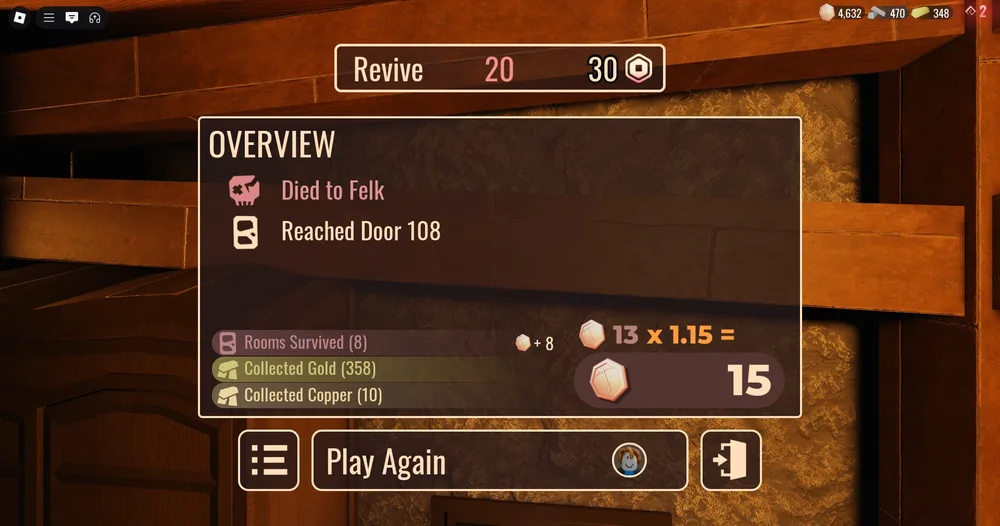
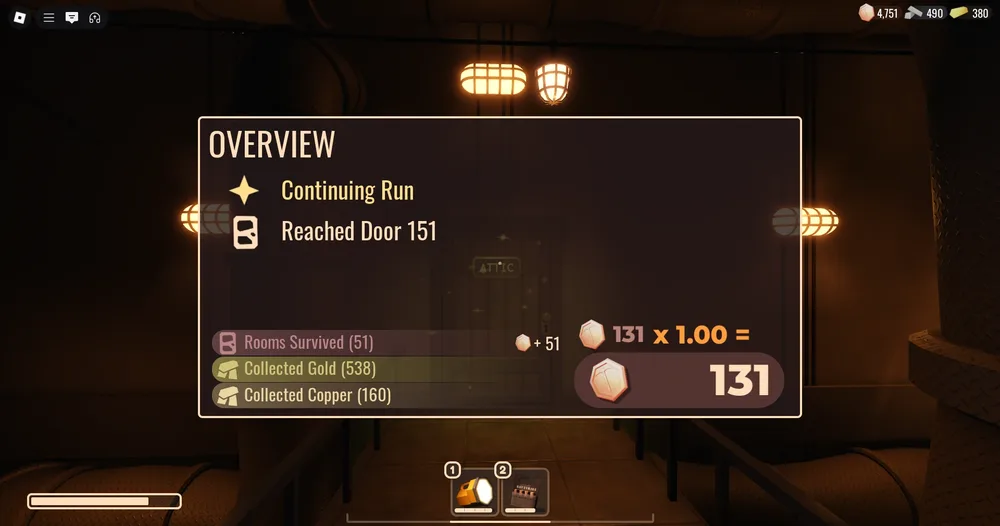
The top will tell players what entity they died to (unless they escaped) and the door they reached in that same run. The bottom will count up the amount of rose gold coins they get, using the following info:
- Rooms survived, 1 rose gold coin per room
- Floors escaped, 50 rose gold coins gained for every floor.
- Copper, 1 rose gold coin for every 2 copper. Counted from death, rounds up.
- Modifiers, can increase or decrease the rose gold coin gain.
There is a button to hide the menu so players can spectate (left), a button to leave the game (right), and a button to play again when all players have won or died - so they can play another game with the same players (center). The button to play again will display a 30 second timer before taking players to a new game, and they can opt in to play again by clicking the button, turning their profile picture into a green check. Anyone who disconnects will have a red unplugged icon over their avatar.
When a player enters The Attic, a death screen will appear but will show "Continuing Run" instead of "Died to ___".
Moonlight
Moonlight will call to a player when dying to an entity, providing tips for them and giving the entity's name. Players can speed up this interaction by clicking through the messages.
Upon dying, the dead player's screen changes to a pitch black room that seems to be filled with water, with Moonlight's symbol at the top of the screen, which emits a bright blue light, and the player's avatar is floating in said water, after Moonlight's death messages, the camera returns to where the player died/switches to spectating any other player remaining alive.
Starlight
Starlight, similarly to Moonlight, will call to the player after dying to an entity and will instead provide vague tips on the entity as well telling that entity's name. However, Starlight will keep encouraging the player to continue no matter the amount of times a player has died to an entity.
When a player dies, Starlight's symbol will appear at the top of the player's screen emitting off a bright yellow light in an otherwise pitch black room filled with water which the player is supposedly swimming in. After Starlight's messages, the player will be presented with the overview screen.
Redlight
Redlight, similarly to the other lights, will appear upon dying to a Stalker or a train as the Modifiers symbol, emmiting red light while the player is floating in a pitch black room filled with water. However, the tips Redlight gives are usually sarcastic, and can go as far as mocking players. When all the messages are gone, the player will go to the overview screen.
Entire process
After the player is killed by an entity, their health reaches 0. Shortly after, the screen becomes black and the skull icon pops up. Then, Moonlight, Starlight or Redlight appears while the player is floating in water. It will show the entity's name as well as tips and tricks to avoid the entity. (Example: You died to Felk, it's similar to the entity you encountered before... etc.) Then, the player will be seen spectating a random player still in the round or a photo of the room they died, while a board appears, displaying their statistics from the run (E.g. Died to Seek, reached Door 138, etc.). They may either spectate the alive player(s), teleport back to the Lobby or revive unless they ran out.
Notes
- In The Lost Floors, only the number of rooms survived affects the rose gold coins gained when dying or beating the game (if not including the modifiers bonus).
- When Modifiers are active, Moonlight will not appear to give tips after the player dies, and they will be sent straight to the death screen.